= HF8V = / = SP8WJT = / = SP0106RZ =
HF-1711/HF-17710
PROJECT: HF-1711/HF-17710
DESCRIPTION: Display LED KB400, DL1416, 16 alphanumeric
BRAND: ?
STATUS: u
PROJECT START DATE: 2012
LOCALISATION: WU
DOCUMENTATION: recreated, M-1 p. 2-4
PCB: TPD57710
DIMENSIONS: 143 x 72 mm
WS-###: WS-010
SUPPLY VOLTAGE: 5V
INPUT INTERFACE: 12 lines
16 positions, red, alphanumeric LED display based on SIEMENS DL1416 with simple TTL combinational driver on 74138 and 74374. 12 control lines are needed, but also 6 additional control LEDs can be connected to 74374. Unfortunatelly even if SIEMENS called it 'intelligent displays' latching is not possible in this circuit.
Documentation was recreated and AVR driver has been written first for HF-6048 system...
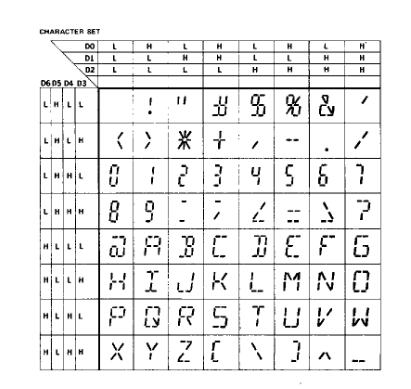
DL1416 character set
DL1416 offers display 6 bit alphanumeric data (with 7 bit codes) which is enough to display simple strings.
I like this 'military style' displays, I found this more interesting than typical LED displays.
FUNCTIONAL DESCRIPTION
Demux 74138 and latch 74374 helps in lowering driving lines in this circuit. Addressing signals are routed throught 74138:
000 - D0 - DSP1.CE/
001 - D1 - DSP2.CE/
010 - D2 - DSP3.CE/
011 - D3 - DSP4.CE/
100 - D4 - 74374.CLK
101 - D5 - not used
110 - D6 - not used
111 - D7 - not used
And further 74374 latching signals for LEDs and subaddresses:
Q0 - LED1
Q1 - LED2
Q2 - LED3
Q3 - LED4
Q4 - LED5
Q5 - DL1416.A0
Q6 - DL1416.A1
Q7 - not used
So, this mechanism allows choosing display, latching subaddresses for DL1416, while data bus and control lines WR/ and CU/ are connected to all DL1416s.
Connector:
15/ DL1416.CU/
16/ 74138.A0
17/ 74138.A1
18/ DL1416.WR/
19/ DL1416.D2
20/ 74138.A2
21/ DL1416.D1
22/ DL1416.D0
23/ DL1416.D3
24/ DL1416.D4
25/ DL1416.D5
26/ DL1416.D6
Driving procedure:
INITIALISATION: [*]
1/ WR/ = 0, CU/ = 0
2/ scan all displays and subaddresses
3/ set DATA = 0x00...0x20 or 0x60...0xFF (any nonprintable character)
4/ scan all displays and subaddresses
5/ WR/ = 1, CU/ = 1
DISPLAYING:
1/ set subaddress
2/ set display
3/ set data 0x20...0x5F
4/ WR/ = 0, CU/ = 1
5/ WR/ = 1, CU/ = 1, subadress off
[*] - without this procedure bad data will be displayed at startup
Sources:
[1] DL1416 datasheet
Prefix 17
HF Register
Microcontrollers in my constructions and external equipment
UC Database - my CPU collection
Electronics
Main Page