



Table of Contents
PrefaceInstallation
Example
Step 1: Create database
Step 2: Business Model
Step 3: File descriptor
Identities
Step 4: Compile and enhance
Step 5: Create database schema
Step 6: The DAO class
Step 7: Execute the application
References
Preface
Java Data Objects (or JDO in short) is a new specification that handles Java objects' storage to any DBMS transparently to the application and the developer. It is the new standard way to interact with any kind of database (RDBMS, ORDBMS, OODBMS, filesystem) without thinking of the specifics of each database. The developer only designs their business model, and it is JDO's task to map it to the database of choice.This standard allows Java developers to use their object model as a data model, too. There is no need to spend time going between the "data" side and the "object" side.
Various products -- including CocoBase, Castor JDO, iBatis and Hibernate -- try to do this for you. However, now thaat there is a standard way to do this, we get the benefit of having to learn only one way to do it. This is just like when JDBC came along and allowed us to work with any database that provided a driver. JDO seems to be the next step to JDBC and eventually developers will use JDO in place of JDBC to access databases.
JDO is now in version 2.0 (JSR 243) with many new additions and enhancements. Advantages:
- It is a standard on which vendors are based to build their implementations. This means, that you can choose another vendor, while in the mid of development, and you don't need to change a single line of code of your application (as long as you don't use any of the vendor's extensions to the standard).
- JDO runs with all Java 2 SE 1.3+ versions, J2EE and most implementations support a large number of JDBC drivers.
- Training time to start up on JDO is short
- Development and delivery times are reduced and source code quality is increased
- Version 2.0 is mature for developing production code.
In the following, we describe the creation of a simple Java application that uses JDO to store persistent objects to a RDBMS. You can download the source code from here.Check the available JDO implementations, commercial and non-commercial, too.
Installation
We shall need the following tools:
- MySQL as our datastore. It can be downloaded from http://www.mysql.com. Download MySQL J/Connector (mysql-connector-java.jar); this is the JDBC driver to connect to MySQL.
- ant, from http://ant.apache.org. You 'd better add bin directory to your path.
- log4j.jar from here.
- A JDO 2 compatible implementation. As of this writing, JPOX (http://www.jpox.org) is the only JDO 2 compatible implementation, and it's free and open source! JDO is simply a specification. SUN lets various vendors to do the implementation and datastore support. SUN provides the JDO specification for free. It also provides for free the JDO Reference Implementation (http://access1.sun.com/jdo/) that can only persist in the filesystem, in order to prove that the specification is implementable. JPOX is an open source implementation of JDO 2 (Apache license) which you can download from http://www.jpox.org/docs/download.html. You need to download JPOX core, JPOX Enhancer and JPOX JCA Connector.
Create the following folder structure:
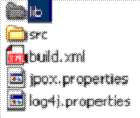
Copy the above libraries to lib folder. We 'll create the rest of configuration files shown in the figure later. You may also download the full source code from here.
Example
We will create a small application of an electronic
bookstore in order to demonstrate JDO in
action. MySQL will be the datastore. I will not go in details
on how to you use MySQL or how you
create databases in general, but only what is required for our
example case study.
A client user should be to search from a list of books or CDs,
search book items using keywords, order books etc. The tradesman should
be able to store new book arrivals, modify or erase books etc.
In order to make the example more interesting and investigate
more of the possibilities of JDO, we will use classes that are
related with various relations (e.g. inheritance).
The steps to develop using JDO are the following:
- Create the database: this is the only step not handled by JDO;
- Business model: Create the classes that we wish to persist in the database;
- File descriptor: Write file descriptor that describes how the class attributes are stored in fields of tables of the database;
- Compile and enhance: Compile and enhance business model objects, by using JDO Enhancer;
- Database schema: Create the database schema (there is no standard way among implementations regarding this step);
- DAO: Create of a Data Access Object (DAO) class to manage persistent objects;
- Build: Go through the steps to build and run the program.
Step 1: Create the database
Create a new database. (You can do that either from command line or by using one of the GUI interfaces to MySQL that exist, like Mascon from Scibit, or MyCC from MySQL, or MySQL Navigator. Otherwise, open a DOS (in Windows) or Command (in Linux) prompt and start mysql by issuing the command mysql (or mysql -u user); note that mysql must be in your path to be able to execute this command; if it is not, then go inside [MySQL installation]\ bin and run the command mysql). Up to MySQL version 4, you can create a database without issuing a username or password if you prefix the database name with the word 'test' (this has changed from version 4.1 and on however). Go on and create the database test_bookstore_db.
mysql> create database test_bookstore_db
That's all you need to do if you are using JDO.
JDO deals with the rest of the details! Isn't this awsome?
Step 2: Business model
First, we need to create our domain model. This is described in the following UML class diagram and is derived from JPOX's basic tutorial: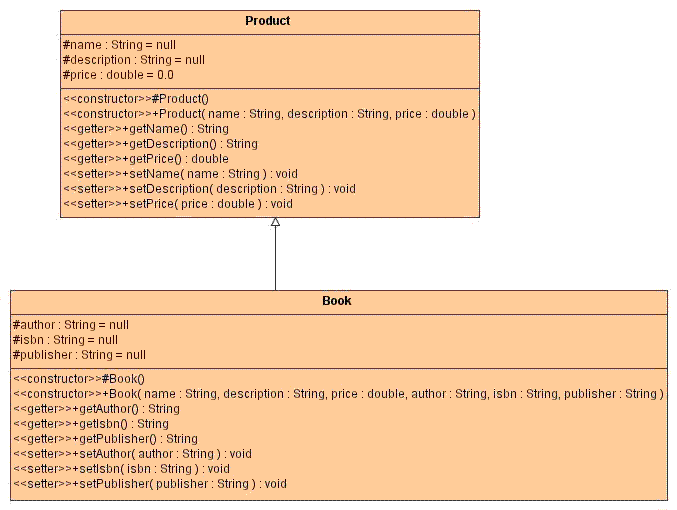
Figure 2. UML class diagram of our business model
These should follow JavaBeans' rules, i.e. there should be a default constructor (this is required by any PersistenceCapable class, and the class will fail the enhancing step if this is not present) and have getXXX() and/or setXXX() methods for the properties of the class.
Save the two files inside src/org/jpox/tutorial/model, as declared in the package line of the classes.
Note that there is an inheritance association between the two classes; some objects are of class Product and others of class Book. This allows us to extend our store in the future to sell e.g. DVDs.
Step 3: File descriptor
Next, we need to define which of the classes attributes will be persisted. We do this by defining an XML metadata file, which is called file descriptor. This file describes the attributes that are to be persisted to the datastore. In other words, the file descriptor maps the class attributes to database fields.
The file descriptor is an .xml file that ends with .jdo. It complies with jdo_2_0.dtd. We can either create a single .jdo file for each class to be persisted or a package.jdo file which describes all persistent classes. We prefer the second solution.
Save the above file as package.jdo inside src/org/jpox/tutorial/model.
<jdo> tag defines this file as a JDO descriptor. <package> tag defines the package name inside which the persistent classes reside (it's good practice to put all persistent classes inside the same package). <class> tags define the persistent classes. Under this tag we define the attributes that are to be stored to the database.Not all attributes of a class need to be mapped to database fields. For each attribute, we define its datatype when it is not obvious how to map to a database type. E.g. attribute "name" is defined to be of type "VARCHAR" and length = "100"; however we don't need to define this explicitly for attribute "price" which is of type int and JDO maps it by default to an Integer field.
Inheritance is declared in the line:
<class name="Book" identity-type="application"persistence-capable-superclass="org.jpox.tutorial.Product">
Identities
Another thing we must make clear is identity-type. There are two basic identity types: application identity and datastore identity. With datastore identity you are leaving the assignment of id's to JDO. Your class will not have a field for this identity - it will be added to the datastore representation by JPOX. A new column will be added to the respective table in the datastore that will serve the purpose of a surrogate key.
<class name="MyClass" identity-type="datastore"></class>
This is the default value of identity-type hence it may be missing.
With application identity your application is taking control of the specification of id's. Application identity requires a primary key class, and each persistent capable class may define a different class for its primary key, and different persistent capable classes can use the same primary key class, as appropriate. If your primary key consists of one attribute only, JDO 2 provides an easier solution: just define this attribute to be primary-key=”true”:
<class name="MyClass" identity-type="application" objectid-class="MyIdClass"><field name="myPrimaryKeyField" primary-key="true"/>
...
</class>
In list 3, we have declared attribute id of class Product to be a primary key and the database to autoassign key values to it, e.g. by declaring it's type as autonumber.
<field name="id" primary-key=”true” value-strategy="autoassign"/>
We could declare isbn to be the primary key, but what if a book's ISBN is not available?
But when and why do we declare identity-type= “application” and when “datastore”? If we wish to have full control about Book objects, e.g. if we wish to fetch a book given it's id (or primary key), then we should use application identity because this is the only way to associate an id to a specific book. With datastore identity, control of identities is on the datastore side and we cannot always associate a specific book with it's id; in that case we need to know other criteria that uniquely identify it (e.g. ISBN).
Step 4: Compile and enhance
It's time to compile and enhance our classes. JDO requires that your classes implement PersistenceCapable interface. You could write the methods required in order for your classes to become PersistenceCapable. Alternatively, you may use a JDO enhancer which enhances your compiled classes by adding the necessary methods for them to become PersistenceCapable.JPOX
provides a bytecode JDO enhancer to enhance your classes
in order to be able to be used by any JDO implementation. Use jpox-enhancer.jar
located inside lib folder. Figure 1
should now contain:
src/java/org/jpox/tutorial/model/Book.java
src/java/org/jpox/tutorial/model/Product.java
lib/jdo.jar
lib/jpox.jar
lib/jpox-enhancer.jar
lib/log4j.jar
lib/bcel.jar
|
List 4. jpox.properties |
javax.jdo.PersistenceManagerFactoryClass=org.jpox.PersistenceManagerFactoryImpl
javax.jdo.option.ConnectionDriverName=com.mysql.jdbc.Driver
javax.jdo.option.ConnectionURL=jdbc:mysql://localhost:3306/test_bookstore_db
javax.jdo.option.ConnectionUserName=root
javax.jdo.option.ConnectionPassword=
org.jpox.autoCreateSchema=true
org.jpox.validateTables=false
org.jpox.validateConstraints=false
|
JDO uses this file to connect to MySQL database. The source code contains log4j.properties used by log4j and build.xml used by ant.
Open a command line window, navigate to the project's home directory, (build.xml should be there) and type the command ant. If everything went smoothly, the following class files should have been created. If the "other scenario" took place, check jpox-enhancer.log.
build/org/jpox/tutorial//model/package.jdobuild/org/jpox/tutorial/model/Book.class
build/org/jpox/tutorial/model/Product.class
build.xml has been configured in order to compile and then enhance the classes so that JPOX can work with them.
<project name="tutorial" default="enhance" basedir=".">
Step 5: Create database schema
If there are no errors, then type the command ant createschema for JPOX to create your database schema! Open test_bookstore_db in MySQL to view the tables that JPOX has created.
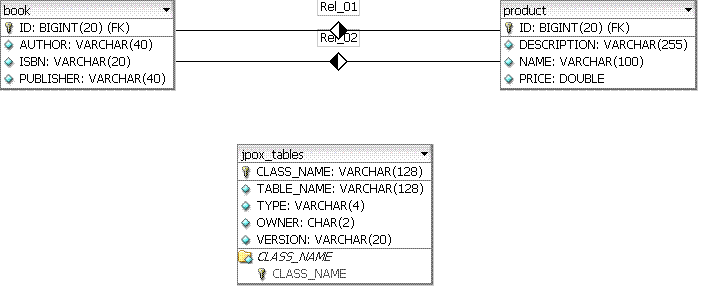
Figure 3 Database test_bookstore_db schema
Step 6: The DAO class
The last step is to create the class that handles the persistent objects. We call this class DAO (Data Access Object) according to [5], but you may call it any name you want.Classes DAO, PersistenceManagerHelper and Main are shown in lists 5-7. Save them under src/org/jpox/tutorial/ and compile them typing ant to a command prompt. To run the program, type ant run.
Step 7: Execute the application
The program's output must be similar to:
C:\jdo-tutorial> ant runBuildfile: build.xml
run:
[java] javax.jdo.JDOUserException: Deletion by query is not yet supported f
or JDOQL queries.
[java] Products in bookstore
[java] =====================
[java] Product : iPod
[java] Product : Core J2EE Patterns: Best Practices and Design Strategies
[java] > Core J2EE Patterns: Best Practices and Design Strategies
BUILD SUCCESSFUL
Total time: 2 seconds
Let's begin from class
Main. To store a persistent object
to the datastore is obvious. In class Main we created two objects of
type Product
and Book
and we saved them to the database by calling static method save()
of DAO
class. All JDO interactions with the database
requires an instance of
PersistenceManager class. Hence, the first thing to do is to retrieve a PersistenceManager
from a factory class. PersistenceManagerHelper.getPersistentManager() (list 6) returns a single PersistenceManager
object for the whole application by applying
the Singleton design pattern
[6]. Method PersistenceManagerHelper.getProperties()
loads the required jpox.properties property file.
Then, we need to get the current transaction from PersistentManager object. A
transaction starts with a begin()
and ends with a commit()
or rollback().
Class DAO (list 5) provides static
methods for storing, deleting and retrieving persistent objects. Saving a persistent object is simple:
tx.begin();
pm.makePersistent(product);
tx.commit();
Hence, the steps to use JDO are:
- retrieve a PersistenceManager from a PersistenceManagerFactory
- get the current transaction from PersistentManager object
- Issue a begin to start a transaction
- process the results
- Commit or rollback the transaction
Transaction tx = pm.currentTransaction();
tx.begin();
book.setDescription("This book has been reduced in price!");
tx.commit();
We may simply retrieve a persistent object if we know its primary key (or id) by the following piece of code:
Transaction tx = pm.currentTransaction();
tx.begin();
Βook book = (Book) pm.getObjectById(Book.class, new Long(id)); //id=1
tx.commit();
To retrieve all products stored in the datastore, make use of an Extent:
Transaction tx = pm.currentTransaction();
tx.begin();
Extent extent=pm.getExtent(Product.class,true);
Query q=pm.newQuery(extent);
Collection results=(Collection)q.execute();
products.addAll(results);
q.closeAll();
tx.commit();
pm.getExtent(Product.class,true) first parameter returns all objects of Product.class while the second, if true retrieves all persistent objects from classes that inherit from Product, too (i.e. Book objects); if false, then only objects of class Product are retrieved.
We may also provide criteria to our queries, in order to filter the results, e.g. retrieve all books that cost less than 50€:
Transaction tx = pm.currentTransaction();
tx.begin();
Extent extend=pm.getExtent(Product.class,true);
Query q=pm.newQuery(extend, "price < 50.00");
q.setOrdering(price ascending);
Collection results=(Collection)q.execute();
products.addAll(results);
q.closeAll();
tx.commit();
If we are certain that only a single object can be the result of a query, (or none), then we can use q.setUnique(true):
Transaction tx = pm.currentTransaction();
tx.begin();
Query q = pm.newQuery(Book.class, "name == bookName");
q.declareParameters("String bookName");
q.setUnique(true);
Book book = (Book) q.execute(bookName); // π.χ. bookName = “iPod”
q.close(book);
tx.commit();
Class Extent returns a collection of Objects. There are cases, though, where we want to retrieve a specific database table field, or else, a single object attribute. JDO 2.0 allows us to define the attribute we wish to return using q.setResult():
Transaction tx = pm.currentTransaction();
tx.begin();
Query q = pm.newQuery (Product.class);
q.setResult("name");
Collection results = (Collection)q.execute();
names.addAll(results);
q.closeAll();
tx.commit();
To empty the database from all records (persistent objects) use:
Transaction
tx = pm.currentTransaction();
Extent extent = pm.getExtent(Product.class, true);
Query q = pm.newQuery (extent);
long deletedCount = q.deletePersistentAll();
System.out.println("Objects deleted: " + deletedCount);
tx.commit();
To delete a single persistent object pm.deletePersistent():
Transaction tx = pm.currentTransaction();
tx.begin();
Book book = (Book) pm.getObjectById(Book.class, new Long(id));
if (book != null)
pm.deletePersistent(book);
tx.commit();
In summary, JDO is a standard which will diminish your development time and will allow you to forget the burden of designing the database for your applications. JDO 2.0 is mature enough to be used in commercial applications.
If you found this rather long article useful and interesting, then you 'd better refer to the references to learn more about this new exciting technology.
References
-
This article's source code.
-
JDO Expert Corner, http://www.jdocentral.com.
-
JPOX, http://www.jpox.org.
-
Almaer Dion (2002), "Using Java Data Objects", http://www.onjava.com/pub/a/onjava/2002/02/06/jdo1.html.
-
Alur D., Crupi J., Malks D. (2003), Core J2EE Patterns: Best Practices and Design Strategies, 2nd Edition, Prentice Hall PTR.
-
Gamma, E., Helm R., Johnson R., and Vlissides J. (1995), Design Patterns Elements of Reusable Components, Addison-Wesley.
-
Peterson R., Bhogal K. S. (2005), "An introduction to JDO 2.0 using JPOX and DB2 Universal Database", IBM Developer Works,
http://www-128.ibm.com/developerworks/db2/library/techarticle/dm-0506bhogal/. -
Roos R. M. (2002), Java Data Objects, Addison-Wesley, http://www.ogilviepartners.com/JdoBook.html.
-
Roos R. M. (2005), JDO 2 Queries, Part 1 & 2, http://www.theserverside.com/articles/article.tss?l=JDOQueryPart1
-
Thomas Paul (2004), "Java Data Objects - An Introduction", http://www.javaranch.com/newsletter/200401/IntroToJDO.html
-
Tilly J. and Burke E. (2002), Ant: The Definite Guide, O’ Reilly.
Creator: John N. Kostaras - email[email protected]
Last modification: 4 April 2006
URL: http://www.geocities.com/jnkjavaconnection/jdotut.html
URL: http://www.ergoway.gr/jkost/jnkjavaconnection/jdotut.html