 |
||
|
Arcade Mode To play the original arcade version of this game, wait for the title screen, then press A + C + Start on Controller Two. Operator Screen Most arcade games have an operator mode so the arcade owner can change the difficulty, number of credits, etc. This game is no exception. To access it, hold X + Y + Z + Start on Controller One |
 |
||
|
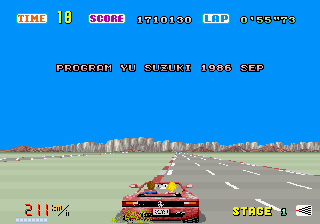
Secret Message Soon after the first separation of track, press "START" buton, and will appear the credit message of Yu Suzuki.
|
 |
||||||||
|
Cheat mode Type "red barchetta" during game play to enable cheat mode. Then, press one of the following keys to activate the corresponding cheat function. Note: This works with the original version of the game and not with the re-released versions.
| ||||||||
 |
||||||||||||||
|
Cheat mode Type "STARION" while playing the game. Now use the following keys:
| ||||||||||||||
 |
||||||||||||||||||||||||||||||||||
|
Hyper difficulty Press C(10), then enter the options screen. A new "Hyper" difficulty level that allows faster acceleration will be selectable under the options screen. View ending sequence Enter "ENDING" as a password. Secret ending: View the endings after all five goals. Press Start after the ending for the fifth goal to view an alternate ending and credits. Hyper options: Press Start at the title screen, then press A(11), B(3), C(8). The hyper options selection, with "Stage Select" and "Mode Select" options, will now be available. The mode select options are as follows.
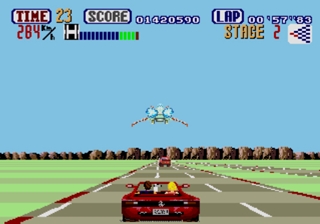
Galaxy Force space ship If you catch the way of the right, and not to beat your car, or leave the track, in the beginning of 3º stage, the GALAXY FORCE space ship will make a fly in the track !
| ||||||||||||||||||||||||||||||||||
 |
||
|
Stop Timer To freeze the timer, press Left, 1, 2, Start at the title screen. |
 |
||
|
Sound Test Press Start; when you see the hand on the radio knob, press Right, Left, Down, Up. Then move your pad to the desired song, and hold it there. To keep your song, press Button 1. If you do not choose a song, you will only hear Wave Sounds, and the game will begin. |