
Hey! Do you yearn for a simpler time? A time when there were no copilots or cortanas, no bitcoins or Elons. I do. That's why I downloaded random programs from sketchy websites, wayback machine links, ect. all to get my version of windows to look like an erlier version of windows. Here's how.
STEP ONE:
Taskbar, Start menu, Window borders ect
Download this beutiful .zip by u/devo574:
XP Megapack.zip
It will have most of the programs used in this theme, but I will show you some extras later on.
First, run Retrobar. It will take you to a webpage to install microsoft .NET core. That is OK. Just download and run the installer.
When the installer finishes, Run Retrobar again. It will replace your taskbar. Left click the task bar and go into the proporties. Set the skin to XP Luna Blue.
The Taskbar is done!
Run the Openshell installer. When it finishes, press the windows key. This will open the OpenShell menu setings. Set the style to Classic with two columns, and then go into the skin tab. set the skin to XP Luna. Configure the other settings however you want to. Now run Classicsounds. Go through the installer and it will automatically replace all the windows 10 sounds with XP ones.
Go into the XP Shutdown folder and drag XP Shutdown and Logoff into the quicklaunch area on retrobar. (The tiny icons in the corner.)
Set the Bliss 4k wallpaper or any other XP wallpaper from that folder. (The ones riped straight from XP look blurry on most modern computers.)
Drag the three folders in the Extras folder onto your desktop. Those are the apps and games, as well as screensavers. You can right click the screensaver you like most and select install or configure. configure lets you change the settings of a screensaver, and intall lets you select it as the screensaver. My fav is the 3D pipes and maze.

STEP TWO:
Account pics, Explorer, Icons, Windows, ect.
Download User Account pics HERE and ExplorerXP HERE.
Unzip the account pics and run the installer. Then search for explororxp in the start menu and drag it ont the quicklaunch location. Than, optionally remove the win10 file exploror from quicklaunch.
Press Win+i and settings will open. Go into user settings, the browse for profile pic. Locate the desired pfp and select it. I picked the frog.
Head over HERE and click the link to 3rvx.com. download it and run the installer. Download the XP Cream skin from the WinClassic link. Unzip it and select the folder containing the theme files. press control+x. now, navigate to C:\Program Files (x86)\3RVX, and paste the theme folder inside the skins directory. now, open the start menu and search 3rvx. left click it and select Open file location. In thaat folder, run 3rvx settings. Under the skins dropdown menu, select the XP theme. Now you can find the volume slider in the system tray.
Go HERE and download and install WindHawk. Now open it and select Create a new mod. (left bottom corner.)
[I know this sounds hard but I promise it is easy]
Now go HERE and copy the code box. (you may need to click show spoiler.) now go back into windhawk. select any text in the code area, then press control+A, followed by control+V. Select compile mod and you will now have the disk pie-chart in disk proporties.
Go HERE to download Windowblinds and HERE to download Iconpakager, on both pages, click try 30 day trial. download and install both programs. go HERE to get a temporary email adress to use for the free trial. (bookmark this page and get a different email every time for infinite free trials.) Open windowblinds and set up the free trial using the menu. Then, select the Luna theme. Wait for it to finish and now you have XP styled windows.
Open IconPackager from start menu and Setup the free trial in the same way. It should already be filled in from windowblinds. now, go HERE and download the iconpackage. Run the iconpackage and it should automaically install. Now you have XP Icons!
STEP THREE:
Microsoft agents
Have you ever wanted to use Clippy, Bonzibuddy, Peedy, Merlin, ect on your computer? Turns out it's still possible!

This is optional, but to get microsoft agents on windows 10, including Bonzibuddy, there are many choices. You can get them HERE. First you will have to download DoubleAgent from the list of softwares. Run its installer, then search DoubleAgent in start menu. Once it opens, click into the emulation tab, and select use doubleagent. Now you can run ms agent apps! I use DeskBot, a clipboard reader and tima announcer. You can use any ms agent with it.
(You will need to download charecters from HERE and place them in the C:\Windows\MSAGENT\CHARS directory.)
FINAL PRODUCT:
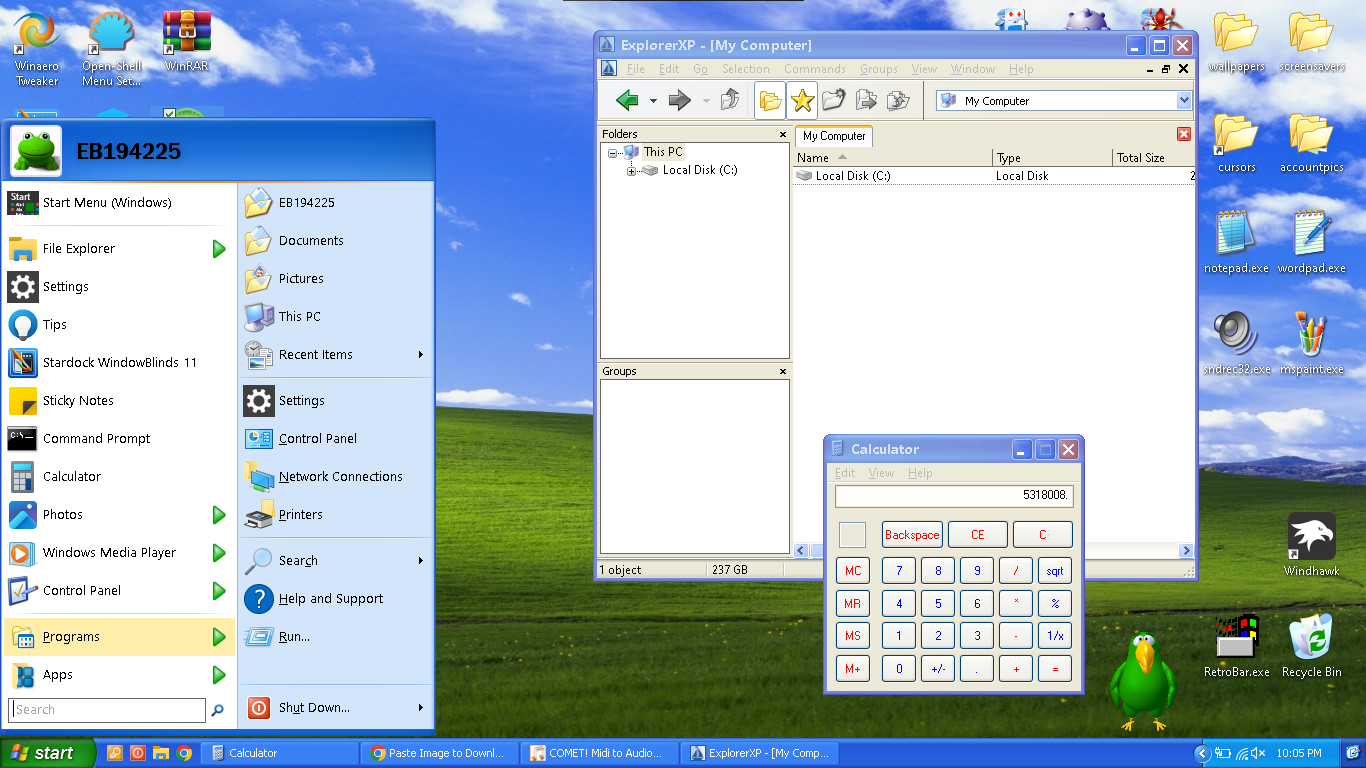
Well, This is what the final product should look like if you did everything right. If you had any problems, I might be able to help if you email me with a screenshot. Have a blissful day! :D