



Table of Contents
Introduction
JMS Architecture
JMS Messaging Models
JMS Example
JMS
Provider: JBoss configuration
Core JMS API
Client: JMS
Producer
Client:
JMSConsumer
JMS Unified Client API
Execute the
example
Client:
JMSConsumer revisited
JMS
Topics instead of Queues
Reliability - Durable Subscriptions
Message Driven Beans
Client:
JMS Consumer revisited
Transactions
Distributed
Transactions
Summary
References
Introduction
JMS
or Java Messaging System is
an asynchronous communication API for Java applications. The JMS
Specification is defined in JSR 914 [1].
The Java Message Service was developed by Sun Microsystems to provide a
means for Java programs to access enterprise
messaging systems or message oriented middleware
(MOM). They provide a mechanism for integrating
applications in a loosely
coupled way. They provide asynchronous delivery
of data between applications on a store and forward basis; i.e., the
applications do not communicate directly with each other, but instead
communicate with the MOM, which acts as an intermediary [2], thus handling all network
communication details for you. If e.g. the network connection is not
available, the MOM will store the message until the connection becomes
available, and then forward it to the destination. Thus, the JMS API is
characterised as asynhronous
and reliable (it
can ensure that a message is delivered once and only once).
Even though Messaging follows the same principles as electronic mail
(email), messaging differs from electronic mail, which is a method of
communication between people or between software applications and
people. Messaging is used for communication between software
applications or software components.
In the following we 'll show a simple Java "Hello JMS" message exchange application using JMS 1.1.
JMS Architecture
The main players of the JMS architecture are the following [2, 3]:- JMS Provider: A messaging system that implements the JMS specification. A JMS Provider, also known as a JMS Server, routes messages between clients.
- Clients: Java applications that send or receive JMS messages. A message sender is called the Producer, and the recipient is called a Consumer.
- Messages: Messages contain data or events exchanged between Producers and Consumers.
- Destinations: A Producer sends a message to a JMS Destination (either a Queue or a Topic), and the Consumer(s) listening on the JMS Destination receives the message.
JMS Messaging Models
JMS has two messaging models [3]: Point-to-Point (P2P) and Publish-Subscribe (Pub-Sub). P2P is a traditional one-to-one queueing mechanism, i.e. although multiple Consumers can listen on a queue, only one Consumer receives a particular message. Producers send messages to a queue, and the JMS Provider (aka JMS Server) delivers each message sequentially to a Consumer listening on the queue. The following figure shows the relationships between Point-to-Point Producers and Consumers.
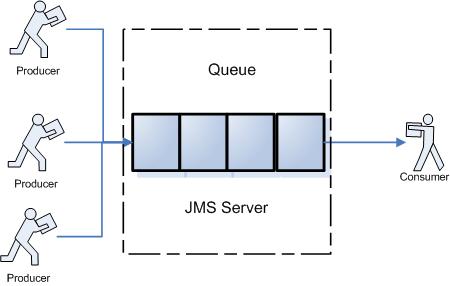
Figure 1 JMS Queue
Publish-Subscribe is a one-to-many broadcast model, similar to a newsgroup or a bulletin board or an RSS newsfeed. Producers publish messages to a topic, and the JMS Server delivers messages sequentially to those Consumers subscribed to that topic. The following figure shows the relationships between Pub-Sub Producers and Consumers.

Figure 2 JMS Topic
The biggest difference between P2P and Pub-Sub is that in the Publish-Subscribe Model, all Consumers that subscribe to a Topic can receive all messages published to that topic, while with Point-to-Point, only one Consumer on a queue receives a particular message.
Even though JMS is inherently asynchronous, the JMS specification allows for messages to be consumed in either of two ways [10]:
-
Synchronously: A subscriber or a receiver explicitly fetches the message from the destination by calling the receive method. The receive method can block until a message arrives or can time out if a message does not arrive within a specified time limit.
-
Asynchronously: A client can register a message listener with a consumer. A message listener is similar to an event listener. Whenever a message arrives at the destination, the JMS provider delivers the message by calling the listener's onMessage method, which acts on the contents of the message.
- An object must implement java.io.Serializable.
- Each data member must be serializable. By default, String, the Java primitives (int, float, and so on) and the Java primitive wrappers (Integer, Float, and so on) are all serializable.
JMS Example
Now that we know the basics of JMS, we 'll create the players of our JMS application:- JMS Provider: The JMS Provider will be JBoss, a full J2EE application server which provides support for JMS 1.1.
- Clients: Our clients will be a JMSProducer and a JMSConsumer java class.
- Messages: The JMSProducer will send a simple "Hello JMS" TextMessage to be delivered to the JMSConsumer.
- Destinations: The JMS Destination will be a queue, named MyQueueXA. The JMSProducer will post to this queue and the JMSConsumer will listen to this queue to consume the message.
JMS Provider: JBoss configuration
To execute and test the program, you need access to a vendor implementation of JMS. Most Java 2 Enterprise Edition (J2EE) application servers provide an implementation of JMS. JBoss is such an application server. JBoss Messaging provided by default with JBoss 4.2 supports the latest JMS 1.1 specification and it offers vastly improved performance in both single node and clustered environments compared to the older JBossMQ JBoss JMS provider [9]. However, this is something that doesn't bother us as users of the JBoss JMS service.
To setup a JMS message queue or topic in JBoss is very easy. There are actually 3 ways to do this [3,7,8,9]:
- Using the JMX console: Start the JBoss application server (%JBOSS_HOME%/bin/run.bat or $JBOSS_HOME/bin.run.sh) and open the JMX console (http://localhost:8080/jmx-console). Click on the service=DestinationManager link (under the jboss.mq heading) to see the JBossMQ DestinationManager MBean page. Look for the createQueue( ) operation and enter jms/MyQueue for the first parameter (the J2EE JNDI name would then be java:comp/env/jms/MyQueue), and queue/MyQueue for the second parameter (the JBoss-specific JNDI name). The JMX-console has the advantage that it is easy to use and you can dynamically specify JMS resources; the disadvantage though is that your changes are lost once you shut down JBoss
- Add an <mbean> element for the queue to $JBOSS_HOME/server/default/deploy/jms/jbossmq-destinations-service.xml file. This file is part of the core JBoss deployment and contains JBoss-specific default test Queues and Topics. This has the advantage that the changes survive JBoss startup/shutdowns; the disandvantage is however that you mix-up your destinations with JBoss internal destinations.
-
The best solution is to create your own service descriptor file (post-fixed with -service.xml) that resides in $JBOSS_HOME/server/default/deploy and add an <mbean> element for the queue. This way your changes survice JBoss startup/shutdowns and you don't mix-up your destinations with JBoss internal destinations. Co-mingling destinations is bad because each time you upgrade to a new version of JBoss, you have to re-add the <mbean> elements to your service descriptor to make things work again.
<?xml version="1.0" encoding="UTF-8"?>
<server>
<mbean code="org.jboss.mq.server.jmx.Queue" name="jboss.mq.destination:service=Queue,name=MyQueue">
<depends optional-attribute-name="DestinationManager"> jboss.mq:service=DestinationManager</depends>
</mbean>
</server>
|
<mbean
code="org.jboss.mq.server.jmx.Queue"
name="jboss.mq.destination:service=Queue,name=MyQueue"> |
That's it! Please note that destination without a configured SecurityManager or without a SecurityConf will default to role guest with read=true, write=true, create=false. If you want to setup a SecurityManager, you should modify your mbean similar to this:
<?xml
version="1.0" encoding="UTF-8"?>
<server>
<mbean code="org.jboss.mq.server.jmx.Queue"
name="jboss.mq.destination:service=Queue,name=MyQueue">
<depends
optional-attribute-name="DestinationManager">
jboss.mq:service=DestinationManager</depends>
<depends
optional-attribute-name="SecurityManager">jboss.mq:service=SecurityManager</depends>
<attribute name="SecurityConf">
<security>
<role name="guest" create="false" read="true"
write="true"/>
<role name="senders" create="false" read="false"
write="true"/>
<role name="receivers" create="false" read="true"
write="false"/>
</security>
</attribute>
</mbean>
</server>
|
<!-- The jndi name of
the DataSource, it is prefixed with java:/ --> |
|
<mbean
code="org.jboss.jdbc.HypersonicDatabase"
name="jboss:service=Hypersonic"> |
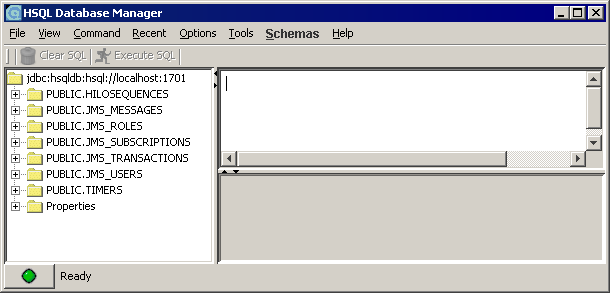
Figure 3 HSQL DB Manager
As you can see, JBoss uses 5 tables for JMS handling, which are shown in the following ER diagram.
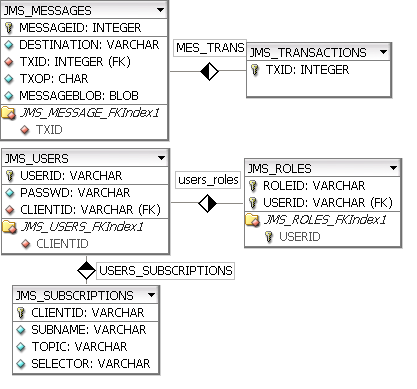
Figure 4 JMS Entity-Relationship model used by JBoss
| MESSAGEID | DESTINATION | TXID | TXOP | MESSAGEBLOB |
| 1 | QUEUE.MyQueueXA | A | SpyTextMessage {Header ...} |
Core JMS API
- Message: Holds business data and routing information. Although you'll find several types of Messages, most of the time you'll use either a TextMessage (that contains textual data in its body) or an ObjectMessage (that holds serializable objects in its body).
- Destination: Holds messages sent by the Producer to be received by the Consumer(s). A Destination is either a Queue or a Topic that the JMS Server manages on behalf of its clients.
- Connection: Enables a JMS client to send or receive Messages. Use a Connection to create one or more Sessions.
- ConnectionFactory: A ConnectionFactory is either a QueueConnectionFactory or a TopicConnectionFactory, depending on the messaging model, and it exists to create Connections.
- Session: A Session creates Producers, Consumers, and Messages. A Publish-Subscribe application uses a TopicSession, and a Point-to-Point application uses a QueueSession. Sessions are single-threaded.
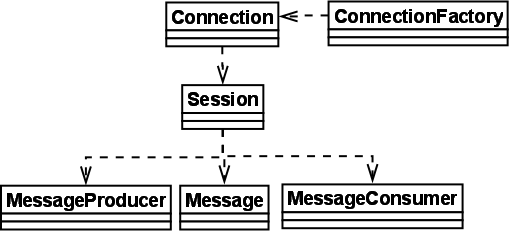
Figure 5 JMS API - class diagram
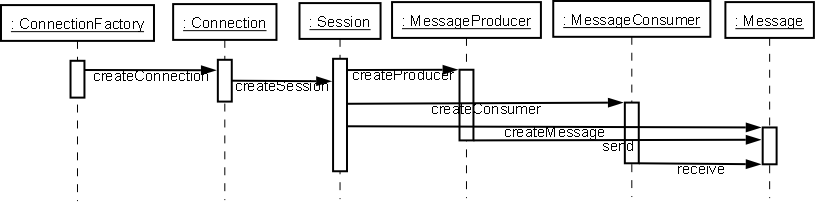 Figure 6
JMS State Transition
Diagram
Figure 6
JMS State Transition
Diagram
Client: JMSProducer
We'll take the following steps to send a message:- Look up a ConnectionFactory using JNDI.
- Get a Connection from the ConnectionFactory.
- Create a Session associated with the Connection.
- Look up a Destination using JNDI.
- Create a Message Producer tied to the Destination.
- Create a Message.
- Send the Message.
- Tear down the Message Producer, Session, and Connection.
| Listing 1. JmsProducer.java |
package jms.producer; |
- The first parameter is a boolean that determines whether the Session is transacted. We've set this value to false because we don't want to manage the transaction programmatically. We use Container-Managed Transactions so that JBoss manages the transaction for us.
- The second parameter sets the acknowledgment mode. Using AUTO_ACKNOWLEDGE means that once the Consumer receives a message, an acknowledgment is sent to the JMS server automatically. Usually, you should use AUTO_ACKNOWLEDGE and let the container do all the work for you.
Client: JMSConsumer
The code for the JMSConsumer is similar.The receive() method can be used in several ways to perform a synchronous receive. If you specify no arguments or an argument of 0, the method blocks indefinitely until a message arrives. For a simple client program, this may not matter. But if you do not want your program to consume system resources unnecessarily, use a timed synchronous receive.
Message message = messageConsumer.receive(1); // wait for 1 ms
Message message = messageConsumer.receiveNoWait(); // receive a message only if one is available
JMS Unified Client API
We recommend using the Unified API because it simplifies development; you don't need the Queue or Topic APIs anymore. You'll still send messages to a Queue or Topic (depending on the JNDI name you use), but this is now just a configuration issue. Your code becomes much more generic because it no longer uses queue or topic-specific API calls. With the Unified API, you always access JMS-based resources in the same way, regardless of your JMS messaging model.
We've wrapped the JMS API calls in the JmsProducer class to make it easy to send a JMS message. The JmsProducer uses the ServiceLocator utility class to find the ConnectionFactory and the JMS Destination using JNDI.
The getJmsConnectionFactory( ) and getJmsDestination( ) methods, respectively, encapsulate a JNDI lookup for a JMS ConnectionFactory or JMS Destination. Both methods have the following steps in common:
- Create the InitialContext to access the JNDI tree.
- Perform a JNDI lookup.
- Cast the object returned from JNDI to the correct JMS object type (ConnectionFactory or Destination) .
- Throw a ServiceLocatorException that chains a low-level JNDI-related exception and contains a corresponding error message.
Execute the example
Client: JMSConsumer revisited
| Listing 4. JmsListener.java |
package jms.consumer; import javax.jms.*; /** |
|
// 6. Receive a Message. |
| Listing 5. JmsConsumer.java |
// 5. Create a Message Consumer tied to the Destination.
|
That's it. Run the JmsProducer again a couple of times, check the JMS_MESSAGES table to see that more than one JMS messages have entered the queue, and then execute the modified JmsConsumer. You will notice that this time all JMS messages are consumed, before the program exits, and that you see the message "Hello JMS" more than once in your console.
JMS Topics instead of Queues
As we have already mentioned, deciding on a topic or a queue is simply a configuration issue. Here is the service descriptor for the topic.<?xml
version="1.0" encoding="UTF-8"?>
<server>
<mbean code="org.jboss.mq.server.jmx.Queue"
name="jboss.mq.destination:service=Queue,name=MyQueue">
<depends
optional-attribute-name="DestinationManager">
jboss.mq:service=DestinationManager</depends>
</mbean>
<mbean code="org.jboss.mq.server.jmx.Topic"
name="jboss.mq.destination:service=Topic,name=MyTopic">
<depends
optional-attribute-name="DestinationManager">
jboss.mq:service=DestinationManager</depends>
</mbean>
</server>
private static final String MY_TOPIC = "topic/MyTopic";You 'll see the difference only when you run the programs again. Run (multiple) instances of JmsConsumer (first), then as you send messages by executing JmsProducer, all JmsConsumer instances receive each message sent by the JmsProducer. If you start the JmsProducer first and then the JmsConsumers, you will notice that the consumers receive no messages. This is another dfference among a queue and a topic, i.e. a consumer subscribing to a topic cannot view past messages. Additionally, notice that you won't see a record in the JMS_MESSAGES table. Topic messages are delivered in the same way a television show is delivered; unless you have the TV on and are watching the show, you will miss it.
Unacknowledged messages for a nondurable TopicSubscriber are dropped when the session is closed. This problem is solved by durable subscriptions, discussed next. Durable subscriptions are like having a VCR recording a show you cannot watch at its scheduled time so that you can see what you missed when you turn your TV back on.
Reliability - Durable Subscriptions
As we saw in the previous section, a consumer subscribing to a topic cannot view past messages. This kind of subscription is called non-durable subscription. A subscription can be durable or non-durable. A non-durable subscriber can only receive messages that are published while it is active. A non-durable subscription doesn't guarantee the delivery of the message or may deliver the same message more than once.A durable subscription, on the other hand, guarantees that the consumer receives the message only once.
The following command, that we already used in Listing 2, creates a non-durable subscription.
// 5. Create a Message Consumer tied to the Destination. |
The most reliable way to produce
a message is to send a PERSISTENT message within
a transaction. JMS messages are PERSISTENT by
default.
The most reliable way to consume
a message is to do so within a transaction, either from a queue or from
a durable subscription to a topic.
Durable subscriptions allow consumers to receive messages sent to topics while the consumers are not active. Durable subscriptions exist only for Topics; queues are reliable by default. A durable subscriber registers a durable subscription by specifying a unique identity [10] that is retained by the JMS provider. Subsequent subscriber objects that have the same identity resume the subscription in the state in which it was left by the preceding subscriber. If a durable subscription has no active subscriber, the JMS provider retains the subscription's messages until they are received by the subscriber or until they expire.
OK, let's start. First, we need to create our users:
| USERID | PASSWD | CLIENTID |
| myPublisher | passwd | |
| mySubscriber | passwd | mySubscriberClientID |
We created two users, one publisher and one subscriber. Check that the ClientID needs to be setup for the subscriber; this way the publisher has flexibility to send messages to specific subscribers only. Next, we setup the roles:
| ROLEID | USERID |
| publishers | myPublisher |
| subscribers | mySubscriber |
| durablesubscribers | mySubscriber |
Be careful to declare mySubscriber both in subscribers and in durablesubscribers. Finally, we wire the clientID with the topic.
| CLIENTID | SUBNAME | TOPIC | SELECTOR |
| mySubscriberClientID | mySubscriber | MyTopic | (null) |
Then, the my-jbossmq-destinations-service.xml file has to be modified like so:
<?xml
version="1.0" encoding="UTF-8"?>
<server>
<mbean code="org.jboss.mq.server.jmx.Topic"
name="jboss.mq.destination:service=Topic,name=MyTopic">
<depends
optional-attribute-name="DestinationManager">
jboss.mq:service=DestinationManager</depends>
<depends
optional-attribute-name="SecurityManager">jboss.mq:service=SecurityManager</depends>
<attribute name="SecurityConf">
<security>
<role name="guest" create="false"
read="true"
write="true"/>
<role name="publishers" create="false"
read="false"
write="true"/>
<role name="subscribers" create="true"
read="true"
write="false"/>
<role name="durablesubscribers" create="true"
read="true"
write="true"/>
</security>
</attribute>
</mbean>
</server>
Note that the role names must match the ROLEIDs in the JMS_ROLES table.
If you are using another database than the default hsqldb, open $jboss/conf/login-config.xml and locate the following:
<!-- Security domain for JBossMQ -->
<application-policy name = "jbossmq">
<authentication>
<login-module
code = "org.jboss.security.auth.spi.DatabaseServerLoginModule"
flag = "required">
<module-option name =
"unauthenticatedIdentity">guest</module-option>
<module-option name = "dsJndiName">java:/DefaultDS</module-option>
<module-option name = "principalsQuery">SELECT PASSWD FROM
JMS_USERS WHERE USERID=?</module-option>
<module-option name = "rolesQuery">SELECT ROLEID, 'Roles' FROM
JMS_ROLES WHERE USERID=?</module-option>
</login-module>
</authentication>
</application-policy>
Make sure that the dsJndiName points to the correct datasource and not to the DefaultDS, otherwise you will get a security error.
Then the code for the JMSProducer has to be modified like so:
// 2. Get a Connection from the ConnectionFactory. |
JMSConsumer's connection has to be modified accordignly:
// 2. Get a Connection from the ConnectionFactory. |
If you run the publisher and then the subscriber, you will see the message 'Hello JMS' in the console output.
Message Driven Beans
A simple MDB is shown in Listing 6. Actually, it is a copy of JmsListener of Listing 4, annotated with EJB 3 annotations, shown in bold! Attention! Your container must support EJB 3.0 or later to execute this code. This is true for JBoss 4.2 or later.
This annotation is an example of an interceptor of Aspect Oriented Programming (AOP) in EJB 3. It is actually executed before the MessageDriveBean class' method onMessage() is executed. This is a handy tool for quickly adding value to your application without modifying existing code!
So, this is it! Now you only need to package the above class to an EJB. Go to the correct output directory and type the following in a command or shell prompt:
$> jar cf MDB.ejb3 jms/consumer/MessageDrivenBean.classCopy the MDB.ejb3 to $JBoss/server/default/deploy/ directory. Execute the JMSProducer from Listing 1; notice the message "Hello JMS" that is produced at the JBoss output window (or check $JBoss/server/default/log/server.log)
22:39:28,655 INFO [STDOUT] Hello JMS
Transactions
A JMS transaction groups a set of produced messages and a set of consumed messages into an atomic unit of work [2]. If an error occurs during a transaction, the production and consumption of messages that occurred before the error can be "undone." Session objects control transactions. A transacted Session always has a begin(); commit() and rollback(). As you might have already guessed, you declare a transaction by setting the first parameter in the createSession() method to true; the second indicates that message acknowledgment is not specified for transacted sessions.
|
// 3. Create a Session
associated with the Connection. |
MDBs in EJB 3.0 are able to use transactions to allow a higher order of control over message processing [12]. By using transactions, you may “roll back” the processing of a particular message if an action fails. This rollback includes the business method that initially required the transaction and the methods it invoked that support transaction processing. There are two types of transactions: Container-Managed Transactions (CMT) and User-defined Transactions.
Container-Managed Transactions (CMT)
With Container-Managed Transactions (CMT), transactions are handled by the container itself. The EJB specification has made provisions for containers to provide their own transaction functionality. This functionality can be added to an MDB merely by annotating the class name with the @TransactionManagement (javax.ejb.TransactionManagement) descriptor. Once the class is annotated, the business methods of the class must be annotated to specify how the container’s transaction functionality will interpret their invocation. This behavior can be specified by using the @TransactionAttribute (javax.ejb.TransactionAttribute) annotation on business methods with either of the following two attributes: REQUIRED or NOT_SUPPORTED.
NOT_SUPPORTED as a transaction type merely alerts the container that any previously existing transactions should be suspended as the MDB executes the method in question. Once the method has finished executing, the transaction is resumed and business continues as usual.
REQUIRED transactions, on the other hand, cascade the transaction functionality to the methods invoked within the original function. Therefore, if a simple SQL INSERT statement fails, all methods invoked up to that point that use transactions are alerted to roll back, taking on their state before the error.
So, to provide CMT functionality to the MDB in Listing 6, you have to add the following annotations:
/**Should a database (or other) operation triggered in the onMessage() method cause a rollback in the current transaction, that rollback will cascade up to the MDB level. This makes sure messages don’t get processed until all the dependent logic executes successfully.
* <code>MessageDrivenBean</code> is the message listener of JMS Messages.
* It implements the specified <code>onMessage</code> method.
*/
@TransactionManagement
@MessageDriven(activationConfig =
{
@ActivationConfigProperty(propertyName="destinationType", propertyValue="javax.jms.Queue"),
@ActivationConfigProperty(propertyName="destination", propertyValue="queue/MyQueue")
})
public class MessageDrivenBean implements MessageListener {
/**
* Receives a JMS message.
* @param message a JMS message
*/
@TransactionAttribute(REQUIRED)
public void onMessage( Message message ) {
// retrieve and process message
User-Defined Transactions
If you wish to use user-defined transactions, you need to modify your code like so:/**Simply add the parameter BEAN to the @TransactionManagement class annotation and the container will assume your MDB is handling all the finer details of transaction management. The first step in managing the transactions manually for a particular class is obtaining it via resource injection. The line @Resource javax.transaction.UserTransaction transaction accomplishes this.
* <code>MessageDrivenBean</code> is the message listener of JMS Messages.
* It implements the specified <code>onMessage</code> method.
*/
@TransactionManagement(BEAN)
@MessageDriven(activationConfig =
{
@ActivationConfigProperty(propertyName="destinationType", propertyValue="javax.jms.Queue"),
@ActivationConfigProperty(propertyName="destination", propertyValue="queue/MyQueue")
})
public class MessageDrivenBean implements MessageListener {
/**
* Receives a JMS message.
* @param message a JMS message
*/
@Resource javax.transaction.UserTransaction transaction;
public void onMessage( Message message ) {
// retrieve and process message
transaction.update(); // Start the transaction
...
transaction.commit(); // Assume transaction went well, commit
Distributed Transactions
Distributed transactions can also be supported by the Java Transaction API (JTA) XAResource API, though this is optional for providers. [TBA]Summary
In this article we gave a detailed introduction to Java Messaging Service (JMS). JMS allows for anynchronous communication between applications in a loosely coupled manner. We discussed the JMS architecture, the messaging models (queue and topic), and we provided useful examples to help you up and running. We also used JBoss as our JMS provider, but you can use any other JMS Provider you wish. Please notice that we used the latest JMS 1.1 specification which allows for more generic code to be used. With JMS 1.1, the destination (queue or topic) is now simply a configuration setting, and you saw the impact in your code.
There are some topics we didn’t cover in detail, like security, message selection, queue browsers etc. For that reason the interested reader is invited to check the references for more information.
References
- SUN Microsystems (2002), JMS Specification JSR 914, http://java.sun.com/products/jms/docs.html.
- Farrell, W. (2004), Introducing the Java Messaging Service, IBM.
- Davis, S. & Marrs, T. (2005), JBoss at Work: A Practical Guide, O'Reilly.
- Monson-Haefel, R. & Chappell D. A. (2001), Java Messaging Service, O'Reilly.
- Haase, K. (2002), Java Messaging Service API Tutorial, SUN Microsystems.
- Giotta, P. et. al. (2000), Professional JMS Programming, Apress.
- JBoss (2006), Getting Started with JBoss 4.0, Release 5, JBoss Inc..
- JBoss (2005), The JBoss 4 Application Server Guide, Release 3, JBoss Inc.
- JBoss (2007), JBoss Messaging 1.4 User's Guide, JBoss Inc.
- Jendrock E. et al. (2006), The Java™ EE 5 Tutorial, Third Edition, Addison Wesley Professional.
- "JMS Transaction with JTA in JBoss 4", http://www.odi.ch/prog/jms-tx.php.
- Mukhar K. & Zelenak C. (2006), Beginning Java EE 5 from Novice to Professional, Apress.
Creator: John N. Kostaras - email[email protected]
Last modification: 25 June 2008
URL: http://www.geocities.com/jnkjavaconnection/jmstutorial.html
URL: http://jkost.ergoway.gr/jnkjavaconnection/jmstutorial.html